Systemic economic impacts of a transportation corridor failure#
This notebook presents an example to demonstarte the systemic economic effects of a transportation corridor (road) failure in Belgium. We will follow the steps outlined below:
Data preparation:
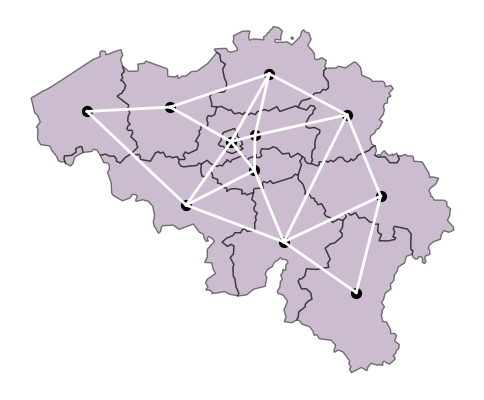
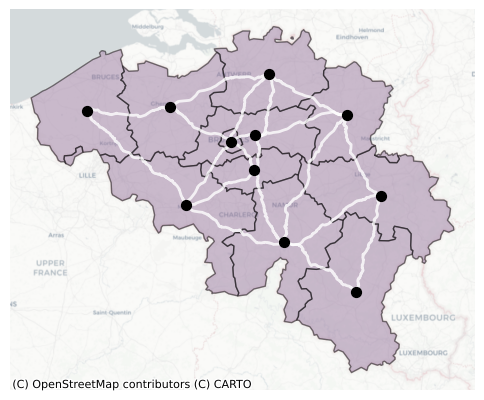
We will first download and create a network graph of the road network of Belgium. Next, we idealise the network into 11 nodes (corresponding to 11 NUTS-2 regions of Belgium) and 20 corridors b/w them.Baseline distance b/w the regions:
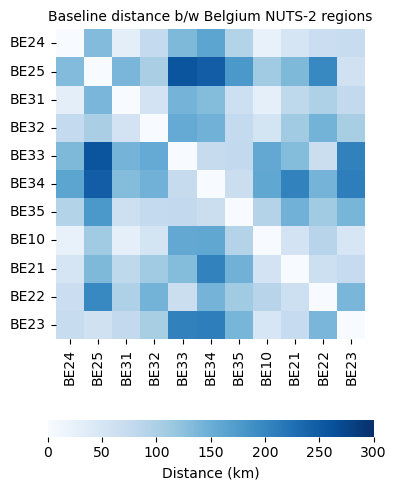
We estimate the distances between the nodes using shortest-path under a no disruption scenario.Distance b/w the regions under disruption:
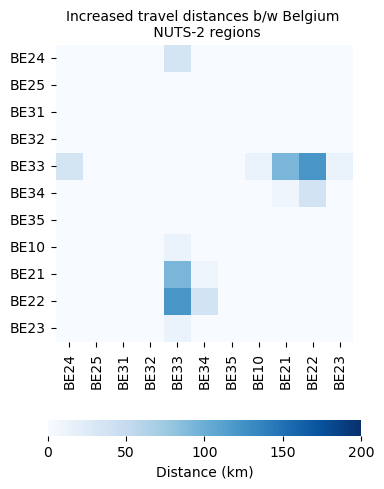
For this example, we assume the road between Limburg (BE-22) and Liege (BE-33) is disrupted. Now we estimate the additional distances travelled b/w regions because of the disrupted corridor.Input-Output Table aggregation:
Next, we read the input-output table for Belgium and aggregate land-transportation sector into a value-added category. Also, we perform a basic input-output check.System-level economic effects:
We use a cost-push IO model (price model) to estimate the increased prices of goods which further leads to decreased consumption. Then, we employ a conventional leontief I-O (quantity model) to estimate the reduced production (output) across regions.Results visualisation:
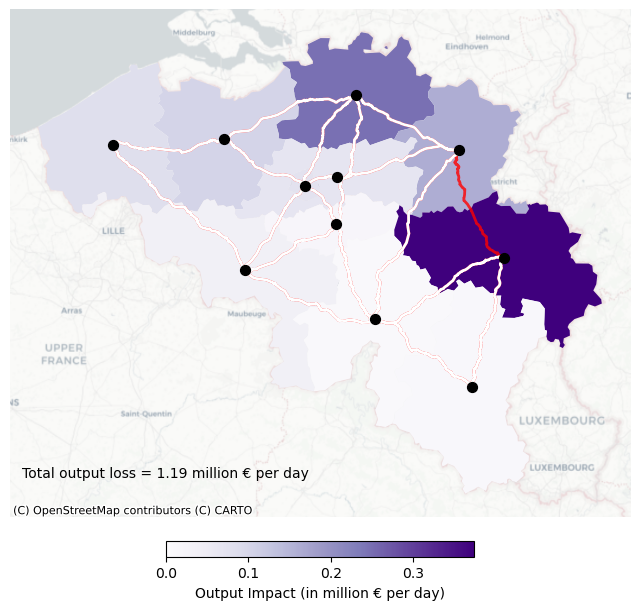
Finally, we visualise the regional production losses across different NUTS-2 regions of Belgium.
1. Loading the required Packages and path directories#
2. Loading the Data#
For the development of this notebook, we consider Belgium as the country of interest and roads for the Critical Infrastructure.
# NUTS 2016 Classification EU level
nuts_eu = gpd.read_file(base_path / 'NUTS_RG_03M_2016_4326.gpkg')

# NUTS-2 Regions of Belgium
nuts_be = nuts_eu[(nuts_eu['LEVL_CODE'] == 2) & (nuts_eu['CNTR_CODE'] == 'BE')].reset_index(drop = True)
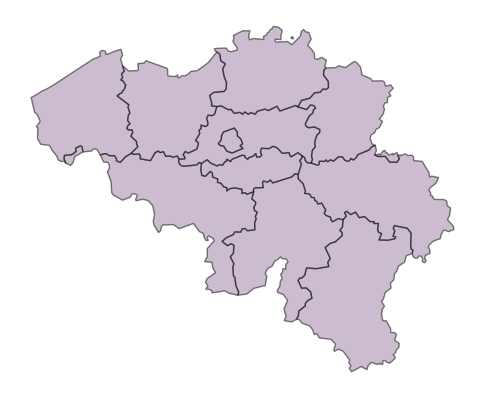
Visualising the NUTS-2 Belgium regions#
# Plotting
fig, ax = plt.subplots(figsize=(6,6))
nuts_be.plot(ax=ax, color = '#9A7AA0',  edgecolor='k', alpha = 0.5)
ax.axis('off')
plt.show()
Creating a points DataFrame#
This will be useful in the later part of the notebook, where the points are assumed as nodes of the network.
# Point dataframe of NUTS-2 region of Netherlands
nuts_be_point = nuts_be.copy()
nuts_be_point['geometry'] = nuts_be.centroid
Downloading the roads of Belgium using DamageScanner.
# Downlaoding the openstreetmap data for the country of belgium
# The path contains the location of the downloaded pbf file
infrastructure_path = download.get_country_geofabrik('BEL')
%%time

# Filtering the line types
roads = gpd.read_file(infrastructure_path, layer="lines")

# Filtering the DataFrame such that the highway columns is not None
roads = roads[roads["highway"].values != None]
CPU times: user 26 s, sys: 11.8 s, total: 37.8 s
Wall time: 1min 41s
roads.head()
| osm_id | name | highway | waterway | aerialway | barrier | man_made | railway | z_order | other_tags | geometry | |
|---|---|---|---|---|---|---|---|---|---|---|---|
| 0 | 75146 | Rue de Thiribut | residential | NaN | NaN | NaN | NaN | NaN | 3 | NaN | LINESTRING (5.00314 50.57241, 5.0032 50.57244,... |
| 1 | 195145 | NaN | motorway_link | NaN | NaN | NaN | NaN | NaN | 9 | "destination"=>"Andenne;Bierwart;Mécalys;Ciney... | LINESTRING (5.06149 50.53069, 5.0604 50.53082,... |
| 2 | 195314 | NaN | motorway_link | NaN | NaN | NaN | NaN | NaN | 9 | "destination"=>"Hannut;Hingeon","destination:r... | LINESTRING (5.00917 50.53085, 5.01038 50.53093... |
| 3 | 197574 | NaN | trunk | NaN | NaN | NaN | NaN | NaN | 8 | "junction"=>"roundabout","lanes"=>"3","lit"=>"... | LINESTRING (4.52797 50.45663, 4.52794 50.45655... |
| 4 | 197576 | Rue du Bois des Loges | residential | NaN | NaN | NaN | NaN | NaN | 3 | "lanes"=>"2","lit"=>"yes","maxspeed"=>"30","su... | LINESTRING (4.96795 50.33742, 4.96782 50.33746... |
3. Build a network graph of the roads#
def build_graph(roads):

    """
    Function to create a network graph i.e., a network of nodes and edges from a DataFrame of roads
    ----------
    roads : GeoDataFrame with lines as geometries

    Returns
    -------
    G : network-x graph
        A graph of nodes and edges. The edges are the linestrings in the roads GeoDataFrame
    """

    roads = roads.copy()
    roads["length_m"] = roads.to_crs("EPSG:31370").geometry.length

    # Creating osmid column
    if "osm_id" not in roads.columns:
        roads["osm_id"] = range(len(roads))

    # Initiate a network x graph
    G = nx.Graph()

    for _, row in tqdm(roads.iterrows(), total = len(roads), desc = 'Building road graph'):
        start = row.geometry.coords[0]
        end   = row.geometry.coords[-1]

        # Adding edge to the graph
        G.add_edge(start, end,osmid = row["osm_id"], length_m = row["length_m"], geometry = row.geometry)

    # Only using the largest connected component
    largest = max(nx.connected_components(G), key=len)
    G = G.subgraph(largest).copy()
    G.graph["crs"] = "EPSG:4326"

    return G
G = build_graph(roads)
Building road graph: 100%|██████████| 2207519/2207519 [01:10<00:00, 31217.87it/s]
4. Plotting the road network of belgium#
print(f"Nodes: {G.number_of_nodes()}")
print(f"Edges: {G.number_of_edges()}")

# Plotting

# Extracting edges and creating a GeoDataFrame
edges = [(G[u][v]["geometry"]) for u, v in G.edges()]
edge_gdf = gpd.GeoDataFrame({"geometry": edges}, crs="EPSG:4326")

fig, ax = plt.subplots(figsize=(6, 6))
nuts_be.plot(ax=ax, color = '#9A7AA0',  edgecolor='k', zorder=1, alpha = 0.5)
edge_gdf.plot(ax=ax, color="white", linewidth=0.5, alpha = 0.5, zorder=2)
ax.axis('off')
plt.show()
Nodes: 639628
Edges: 756518

Next, we create a stylised representation of the road network between NUTS-2 regions of Belgium.
Adjacent matrices are square matrices of size equal to the number of nodes. Here, we consider the NUTS-2 regions as nodes. They contain the connectivity information between the regions. adj(i,j) = 1 if i and j has an edge between them; else 0.
# Adjacenct matrix for the network
adj_df = pd.read_excel(base_path /'adj_matrix.xlsx', index_col = 0)
Plotting the stylised road network of Belgium.
points = np.array([[pt.x, pt.y] for pt in nuts_be_point.geometry])
nuts_ids = nuts_be_point["NUTS_ID"].values

# Build a mapping from NUTS_ID to index
nuts_to_idx = {nid: i for i, nid in enumerate(nuts_ids)}

fig, ax = plt.subplots(figsize=(6,6))

# Plot the points
nuts_be.plot(ax=ax, color = '#9A7AA0',  edgecolor='k',  alpha = 0.5)
nuts_be_point.plot(ax=ax, color='k', markersize=50)

# Plot edges from adjacency DataFrame
for i, start in enumerate(adj_df.index):
    for j, end in enumerate(adj_df.columns):
        if adj_df.loc[start, end] == 1 and i < j:  # avoid double plotting
            x = [points[nuts_to_idx[start], 0], points[nuts_to_idx[end], 0]]
            y = [points[nuts_to_idx[start], 1], points[nuts_to_idx[end], 1]]
            ax.plot(x, y, color='white', lw=2)

ax.axis('off')
plt.show()
Now, we replace the straight lines with actual roads from the previously generated network graph.
def nearest_node(G, lon, lat):
    """
    Function to identify the closest node in a graph to the coordinates of interest
    ----------
    G : network-x graph
    lon: longitude of the coordinate of interest
    lat: latitude of the coordinate of interest

    Returns
    -------
    The closest node to the coordinates of interest
    """

    nodes = list(G.nodes)
    nodes_arr = np.array(nodes)
    dists = np.hypot(nodes_arr[:, 0] - lon, nodes_arr[:, 1] - lat)
    return nodes[np.argmin(dists)]
# Using points DataFrame to extract latitude and longitude
nuts_be_point['x'] = nuts_be_point.geometry.x
nuts_be_point['y'] = nuts_be_point.geometry.y
records = []


for i in range(len(nuts_be_point)):
    for j in range(len(nuts_be_point)):

        nutsid_1 = nuts_be_point.loc[i, 'NUTS_ID']
        nutsid_2 = nuts_be_point.loc[j, 'NUTS_ID']

        connection = adj_df.loc[nutsid_1, nutsid_2]

        if connection == 1:

            node_a = nearest_node(G, lon=nuts_be_point.loc[i,'x'],   lat=nuts_be_point.loc[i,'y'])
            node_b = nearest_node(G, lon=nuts_be_point.loc[j,'x'],   lat=nuts_be_point.loc[j,'y'])

            # Identifying the shorteest path
            path = nx.shortest_path(G, node_a, node_b, weight="length_m")

            # Converting multiple linestrings into a single line
            path_geoms = [G[u][v]["geometry"] for u, v in zip(path[:-1], path[1:])]
            single_line = linemerge(path_geoms)

            #  Appending to the list that stores the start, end and the adge information
            records.append({"nutsid_1": nutsid_1, "nutsid_2": nutsid_2, "geometry": single_line})
# Converting the edges to the DataFrame
roads_nuts2 = gpd.GeoDataFrame(records, geometry="geometry", crs=nuts_be_point.crs)
Creating a new graph with only NUTS-2 regions as nodes and the actual shortest path b/w them as edges.
G_nuts = build_graph(roads_nuts2)
Building road graph: 100%|██████████| 40/40 [00:00<00:00, 13441.13it/s]
Visualising the stylised network with actual roads.
fig, ax = plt.subplots(figsize=(6,6))

# NUTS-2 polygons
nuts_be.plot(ax=ax, color = '#9A7AA0',  edgecolor='k', zorder = 1, alpha = 0.5)\

# NUTS-2 points
nuts_be_point.plot(ax=ax, color='k', markersize=50, zorder = 3)

# Roads
edges_nuts = [(G_nuts[u][v]["geometry"]) for u, v in G_nuts.edges()]
edge_gdf_nuts = gpd.GeoDataFrame({"geometry": edges_nuts}, crs="EPSG:4326")
edge_gdf_nuts.plot(ax=ax, color="white", linewidth=2, alpha = 0.8, linestyle="-", zorder = 2)
cx.add_basemap(ax, source=cx.providers.CartoDB.Positron, crs=nuts_be.crs)

ax.axis('off')
plt.show()
5. Baseline distance between the regions#
# An empty DataFrame of size regions x regions to store the distance b/w them
distance_base = pd.DataFrame(index = nuts_ids, columns = nuts_ids)
for i in range(len(nuts_be_point)):
    for j in range(len(nuts_be_point)):

        # NUTS-IDs
        nutsid_1 = nuts_be_point.loc[i, 'NUTS_ID']
        nutsid_2 = nuts_be_point.loc[j, 'NUTS_ID']

        # Identifying the closest points in the graph
        node_a = nearest_node(G_nuts, lon=nuts_be_point.loc[i,'x'],   lat=nuts_be_point.loc[i,'y'])
        node_b = nearest_node(G_nuts, lon=nuts_be_point.loc[j,'x'],   lat=nuts_be_point.loc[j,'y'])

        # Distance in km
        dist_km = nx.shortest_path_length(G_nuts, node_a, node_b, weight="length_m")/1000
        distance_base.loc[nutsid_1, nutsid_2] = dist_km
Plotting a heatmap of distances b/w the regions#
plt.figure(figsize=(5, 5))

distance_base = distance_base.astype(float)

ax = sns.heatmap(
    distance_base,
    cmap="Blues",
    vmin=0,
    vmax=300,
    square=True,
    cbar_kws={"label": "Distance (km)", "orientation": "horizontal","pad": 0.2,"fraction": 0.04})

ax.set_title("Baseline distance b/w Belgium NUTS-2 regions", fontsize = 10)

plt.tight_layout()
plt.show()
6. Distance between the regions under disruption#
# The NUTS-2 IDs representing the start and end node of the failed corridor
province1 = 'BE22'
province2 = 'BE33'
def edge_removed_graph(G_fn, province1, province2):
    """
    Function to create a new network graph by removing the edge b/w two NUTS-2 regions
    ----------
    G_fn : network-x graph with all roads
    province1: The NUTS-2 IDs representing the start node of the failed corridor
    province2: The NUTS-2 IDs representing the end node of the failed corridor

    Returns
    -------
    an updated network graph with the edge b/w the nodes of interest removed
    """

    G_new = G_fn.copy()

    # The nearest nodes in the network
    node_a = nearest_node(G_new, lon=nuts_be_point[nuts_be_point['NUTS_ID'] == province1].reset_index(drop = True).loc[0,'x'],   lat=nuts_be_point[nuts_be_point['NUTS_ID'] == province1].reset_index(drop = True).loc[0,'y'])
    node_b = nearest_node(G_new, lon=nuts_be_point[nuts_be_point['NUTS_ID'] == province2].reset_index(drop = True).loc[0,'x'],   lat=nuts_be_point[nuts_be_point['NUTS_ID'] == province2].reset_index(drop = True).loc[0,'y'])

    # Remove the edge
    G_new.remove_edge(node_a, node_b)

    return G_new
# Revised graph with failed edge removed
G_nuts_disrupt = edge_removed_graph(G_nuts, province1, province2)
Visualising the failed corridor#
fig, ax = plt.subplots(figsize=(6,6))

# Plot the points

nuts_be.plot(ax=ax, color = '#9A7AA0',  edgecolor='k', zorder = 1, alpha = 0.5)
nuts_be_point.plot(ax=ax, color='k', markersize=50, zorder = 4)

# plot it
edges_nuts = [(G_nuts[u][v]["geometry"]) for u, v in G_nuts.edges()]
edge_gdf_nuts = gpd.GeoDataFrame({"geometry": edges_nuts}, crs="EPSG:4326")
edge_gdf_nuts.plot(ax=ax, color="r", linewidth=2, alpha = 0.8, linestyle="-", zorder = 2)

edges_nuts_d = [(G_nuts_disrupt[u][v]["geometry"]) for u, v in G_nuts_disrupt.edges()]
edge_gdf_nuts_d = gpd.GeoDataFrame({"geometry": edges_nuts_d}, crs="EPSG:4326")
edge_gdf_nuts_d.plot(ax=ax, color="white", linewidth=2, alpha = 1, linestyle="-", zorder = 3)


cx.add_basemap(ax, source=cx.providers.CartoDB.Positron, crs=nuts_be.crs)

ax.axis('off')
plt.show()
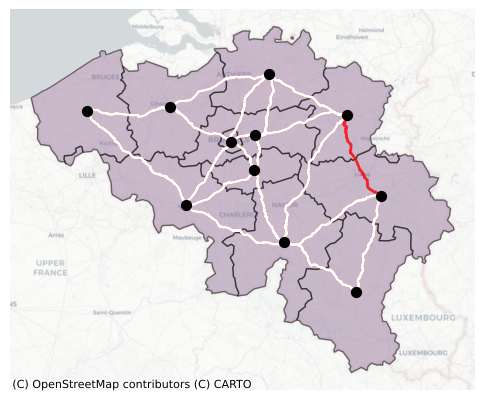
Since a corridor is removed, the shortest distance b/w some of the regions might increase. Next, we estimate the increased distances b/w the regions.
# An empty DataFrame to hold the distance b/w regions after disruption
distance_disrupt = pd.DataFrame(index = nuts_ids, columns = nuts_ids)

for i in range(len(nuts_be_point)):
    for j in range(len(nuts_be_point)):

        # NUTS-ID
        nutsid_1 = nuts_be_point.loc[i, 'NUTS_ID']
        nutsid_2 = nuts_be_point.loc[j, 'NUTS_ID']

        # Nearest nodes in the network graph
        node_a = nearest_node(G_nuts_disrupt, lon=nuts_be_point.loc[i,'x'],   lat=nuts_be_point.loc[i,'y'])
        node_b = nearest_node(G_nuts_disrupt, lon=nuts_be_point.loc[j,'x'],   lat=nuts_be_point.loc[j,'y'])

        # Distance in km
        dist_km = nx.shortest_path_length(G_nuts_disrupt, node_a, node_b, weight="length_m")/1000
        distance_disrupt.loc[nutsid_1, nutsid_2] = dist_km
# Increased distance between regions
delta_distance = distance_disrupt - distance_base
Plotting a heatmap of increased distance between the regions#
plt.figure(figsize=(5, 5))

delta_distance = delta_distance.astype(float)

ax = sns.heatmap(
    delta_distance,
    cmap="Blues",
    vmin=0,
    vmax=200,
    square=True,
    cbar_kws={"label": "Distance (km)", "orientation": "horizontal","pad": 0.2,"fraction": 0.04})

ax.set_title("Increased travel distances b/w Belgium \n NUTS-2 regions", fontsize = 10)

plt.tight_layout()
plt.show()
7. Input-Output table aggregation#
The IO table above is an aggregated IO table for the NUTS-2 regions of Belgium.
The sector ‘p’ represents products i.e., primarily sectors that produce physical goods (e.g., agricultural, manufacturing, minining).
The sector ‘s’ represents service-based sectors.
The sector ‘t’ represents the sector of land-transportation (H49 per NACE-2).
# Reading the IO table for Belgium
io = pd.read_excel(base_path / 'io_belgium.xlsx', index_col = [0,1], header = [0,1])
We aggregate all transport sectors into one single row (value added by land-transport) and single column (final demand for land-transport sector).
# Transport value-added
tva = io.loc[( nuts_ids,'t'),:].sum(axis = 0)

# Dropping all 't' sector rows
io = io.drop(index ='t', level=1)

# Adding the value-added transport column again
io.loc[('R','VA_t'), :] = tva

# Transport final demands
tfd = io.loc[:,( nuts_ids,'t')].sum(axis = 1)

# Dropping all 't' sector columns
io = io.drop(columns ='t', level=1)

# Adding the value-added transport column again
io.loc[:, ('R','FD_t')] = tfd
IO Check: Sum of rows (Output) equals sum of columns (Outlays).
io_check = pd.DataFrame(columns = ['rowsum', 'colsum'])

io_check['rowsum'] = io.sum(axis = 0)
io_check['colsum'] = io.sum(axis = 1)

io_check['diff'] = io_check['rowsum'] - io_check['colsum']
# Converting annaul IO flows to daily flows
io_daily = io/365
8. System-level economic effects#
The increased travel distance between the origin and destinations primarily propagates into the economy via (a) Shortage effect - Products not available in time for continued production activities and (b) Price effect - The price of goods increases due to increased distances for transporting goods from one region to other.
For this example, delays caused by the corridor failure are expressed in hours, primarily because of smaller geography and more re-reouting options available. Hence, we do not consider the shortage effects. However, shortage effects can be crucial when regions are inaccessible or delays are significantly large, as in the case of Suez canal blockage.
io.head()
| r | BE10 | BE21 | BE22 | BE23 | BE24 | ... | BE32 | BE33 | BE34 | BE35 | R | |||||||||||
|---|---|---|---|---|---|---|---|---|---|---|---|---|---|---|---|---|---|---|---|---|---|---|
| sd | p | s | p | s | p | s | p | s | p | s | ... | s | p | s | p | s | p | s | FD | exp | FD_t | |
| BE10 | p | 52.797997 | 169.068634 | 130.508057 | 92.403465 | 60.889435 | 43.626633 | 114.656288 | 68.264587 | 41.833893 | 73.736481 | ... | 55.379299 | 62.748283 | 55.710030 | 15.259095 | 11.886464 | 17.164982 | 24.522854 | 3790.647461 | 3332.961182 | 62.699004 |
| s | 810.859680 | 26420.080078 | 2388.069580 | 6036.488770 | 309.333832 | 1215.953979 | 602.770935 | 2433.725098 | 175.310715 | 2581.921387 | ... | 2333.582031 | 684.252686 | 2161.123779 | 82.515457 | 324.608032 | 103.369423 | 697.338135 | 52434.562500 | 15736.668945 | 1696.505419 | |
| BE21 | p | 762.007507 | 1893.024658 | 12033.195312 | 3364.795166 | 1763.075195 | 811.292114 | 3706.054443 | 1643.714111 | 1364.426636 | 1704.064941 | ... | 761.455383 | 1583.401855 | 895.615173 | 132.257812 | 76.832603 | 138.379105 | 157.111465 | 28321.802734 | 17103.281250 | 1462.361204 |
| s | 477.225769 | 4812.578125 | 9982.744141 | 18079.138672 | 574.655457 | 1236.322388 | 929.046265 | 1922.102295 | 177.873260 | 1763.003174 | ... | 1423.620117 | 352.594543 | 1417.108643 | 37.778591 | 226.722488 | 51.961910 | 533.839539 | 51692.222656 | 4190.382812 | 2383.296903 | |
| BE22 | p | 79.502617 | 211.340836 | 450.302429 | 304.396393 | 264.505524 | 238.780060 | 394.414520 | 264.914520 | 181.066040 | 175.944626 | ... | 175.418854 | 256.165588 | 185.833847 | 32.977226 | 22.460728 | 45.922188 | 46.857548 | 5869.531738 | 6200.022949 | 59.759147 |
5 rows × 25 columns
Preparing arrays for Input-Ouput analysis.
# Intermediate consumption
Z = io_daily.loc[io.index.get_level_values(0) != 'R', io.columns.get_level_values(0) != 'R']

# Final consumption
fd = (io_daily.loc[io.index.get_level_values(0) != 'R', io.columns.get_level_values(0) == 'R'].sum(axis = 1).to_frame(name = 'FD'))

# Output = Intermediate consumption + Final consumption
x = (Z.sum(axis=1) + fd.sum(axis=1)).to_frame(name = 'x')

# Technical coefficients
A = pd.DataFrame(0, index = Z.index, columns = Z.columns, dtype = 'float64')

# Calculating technical coefficients
for i in range(len(x)):
    A.iloc[:,i] = Z.iloc[:,i] / x.iloc[i,0]

# Flattening final demand and Ouptu arrays
fd_array =fd.values.flatten()
x_array = x.values.flatten()

# Converting dataframe to numpy array
A_array = A.values

# Value added array
# This is vector equals the shape number of sectors (11 regions x 2 sectors) , number of va categories
# We have three VA categories VA, Imports and VA by land tranport

va = io_daily.loc[io.index.get_level_values(0) == 'R', io.columns.get_level_values(0) != 'R'].T.to_numpy()

# Dividing the va columns with output to determine va to output ratio for each category
va_x = va/x_array[:,None]

# Sum across the ratio to determine the total va to output ratio
va_x_sum = va_x.sum(axis =1)
Due to the increased travel distance between the NUTS-2 regions, the logistic costs of inputs increase. As a result, the price of outputs produced also increases. This can be quantified using Cost-Push IO Model or the Leontief price Model. Further, consumers reduce consumption due to higher prices. Reduced consumption also leads to reduced production upstream.
Cost-push IO model is given by prices = (leontief inverse)’ x (va/x). Refer Miller&Blair(2009), Chapter 2 for more details.
#Leontief inverse
leontief_inverse = np.linalg.inv(np.eye(len(x_array)) - A_array)

# Leontief inverse transpose
leontief_inv_trans =  np.transpose(leontief_inverse)
Calculating base prices i.e., unit vector check
# Base prices
base_price = leontief_inv_trans@ va_x_sum
base_price
array([1.00000001, 1.00000003, 1.00000001, 1.00000001, 0.99999998,
       1.00000003, 0.99999995, 1.00000004, 0.99999997, 1.00000003,
       0.99999997, 0.99999998, 1.        , 1.00000003, 1.00000002,
       0.99999998, 1.        , 1.00000002, 1.00000003, 0.99999996,
       1.00000001, 0.99999998])
We estimate the ratio of increased distance b/w pre and post disruption across NUTS-2 regions. 1 indicates the flow is unaffected by the disruption. Next, we calculate the flow-weighted increase of this multiplier only for the product sectors. This multipler is then used to increase the value-added cost and the new prices are estimated.
# Ratio of distance travelled in the disrupted scenario to the disatnce travelled in the baseline scenario
ratio_dist_disrupt = distance_disrupt.replace(0,1) / distance_base.replace(0,1)

# product flows
p_flow = io_daily.loc[io.index.get_level_values(1) == 'p', io.columns.get_level_values(1) == 'p']

p_flow.index = p_flow.index.droplevel(1)
p_flow.columns = p_flow.columns.droplevel(1)

#### Weighted ratios
ratio_p_weighted = ratio_dist_disrupt*p_flow

#### Divide the flows
va_t_multiplier = (ratio_p_weighted.sum() / p_flow.sum()).to_numpy()
We assume price shocks affect product sectors and not service sectors. Service economic flows have less dependence on physical transport networks compared to products.
Now, we estimate the increased prices.
# Initialsiing a zero array to the length of all sectors
price_shock = np.ones(len(va_t_multiplier)*2)

# Price shocks only to the product sector
price_shock[::2] = va_t_multiplier

# Price shock is multiplied to the third column of value added which is the cost w.r.t to transport
va_x_revised = va_x.copy()
va_x_revised[:,2] *= price_shock

# Revised va_x_sum
va_x_sum_revised = va_x_revised.sum(axis =1)

# Increased prices
increased_price = leontief_inv_trans@ va_x_sum_revised
increased_price
array([1.00029234, 1.00006241, 1.00061997, 1.00008895, 1.0036805 ,
       1.00011696, 1.0003741 , 1.00008829, 1.00041272, 1.00006979,
       1.00029948, 1.00010032, 1.00015446, 1.00008084, 1.00032213,
       1.0000955 , 1.00985105, 1.00012331, 1.00120859, 1.00008614,
       1.00028291, 1.00009238])
The increased prices are translated to corresponding reduction in consumption. We assume that the demand curve follows dP/dQ = -1 i.e., dP increase in price will lead to dQ decrease in quantity. FD_price_effect = (FD_BASE x -dP) + FD_BASE.
# final demands corrected for price effect
fd_price = (fd_array*(increased_price-1)*-1)+fd_array
Finally, we estimate the new production (or output) required for the reduced demand using a Leontief IO (quantity model).
# X = L-1 x fd
x_price = leontief_inverse@fd_price

# Reduction in output
del_x_price = x_array - x_price

# Creating a new column in the output DataFrame
x['output_loss'] = del_x_price

# Aggregation regioanlly
x_groupued = x.groupby(level =0).sum()

# Merging it to the geodataframe
nuts_be_region = nuts_be.set_index('NUTS_ID')
nuts_price = gpd.GeoDataFrame(pd.merge(x_groupued, nuts_be_region , how = 'inner', left_index=True, right_index = True))
total_output_loss = nuts_price.output_loss.sum()
Results visualisation#
Now, we plot the production decrease in each NUTS-2 region of Belgium.
fig, ax = plt.subplots(figsize=(8,8))

# Plot the points
cmap = plt.cm.Purples
norm = mpl.colors.Normalize(vmin=0, vmax = nuts_price.output_loss.max())

# The nuts dataframe which also contains the information about output loss in the region
nuts_price.plot(ax = ax, column = 'output_loss', cmap = cmap, norm = norm)
nuts_be_point.plot(ax=ax, color='k', markersize=50, zorder = 4)

# Plotting the failed raod
edges_nuts = [(G_nuts[u][v]["geometry"]) for u, v in G_nuts.edges()]
edge_gdf_nuts = gpd.GeoDataFrame({"geometry": edges_nuts}, crs="EPSG:4326")
edge_gdf_nuts.plot(ax=ax, color="r", linewidth=2, alpha = 0.8, linestyle="-", zorder = 2)

# Plotting other roads
edges_nuts_d = [(G_nuts_disrupt[u][v]["geometry"]) for u, v in G_nuts_disrupt.edges()]
edge_gdf_nuts_d = gpd.GeoDataFrame({"geometry": edges_nuts_d}, crs="EPSG:4326")
edge_gdf_nuts_d.plot(ax=ax, color="white", linewidth=2, alpha = 1, linestyle="-", zorder = 3)

# A text box to indicate total loss
ax.text(0.02, 0.1, f'Total output loss = {total_output_loss:.2f} million € per day', transform=ax.transAxes, fontsize=10, verticalalignment='top',zorder=10)

cx.add_basemap(ax, source=cx.providers.CartoDB.Positron, crs=nuts_be.crs)

sm = mpl.cm.ScalarMappable(norm=norm, cmap=cmap)
sm.set_array([])

cbar = fig.colorbar(sm,ax=ax,orientation='horizontal',fraction=0.025,   pad=0.04)
cbar.set_label('Output Impact (in million € per day)')

ax.axis('off')
plt.savefig(os.path.join(outpath, "systemic_impact.png"), dpi=300)
plt.show()